
Custom registration forms
Ask at purchase what you need to know
With Eventbuddy you ask your own questions right at checkout, for the whole order or for each person individually. The answers appear on the order and in the export. Nobody follows up by email, and the time goes into the seminar instead of the attendee list.
- No base fee
- Personal support
- A company from Germany
The fields you need
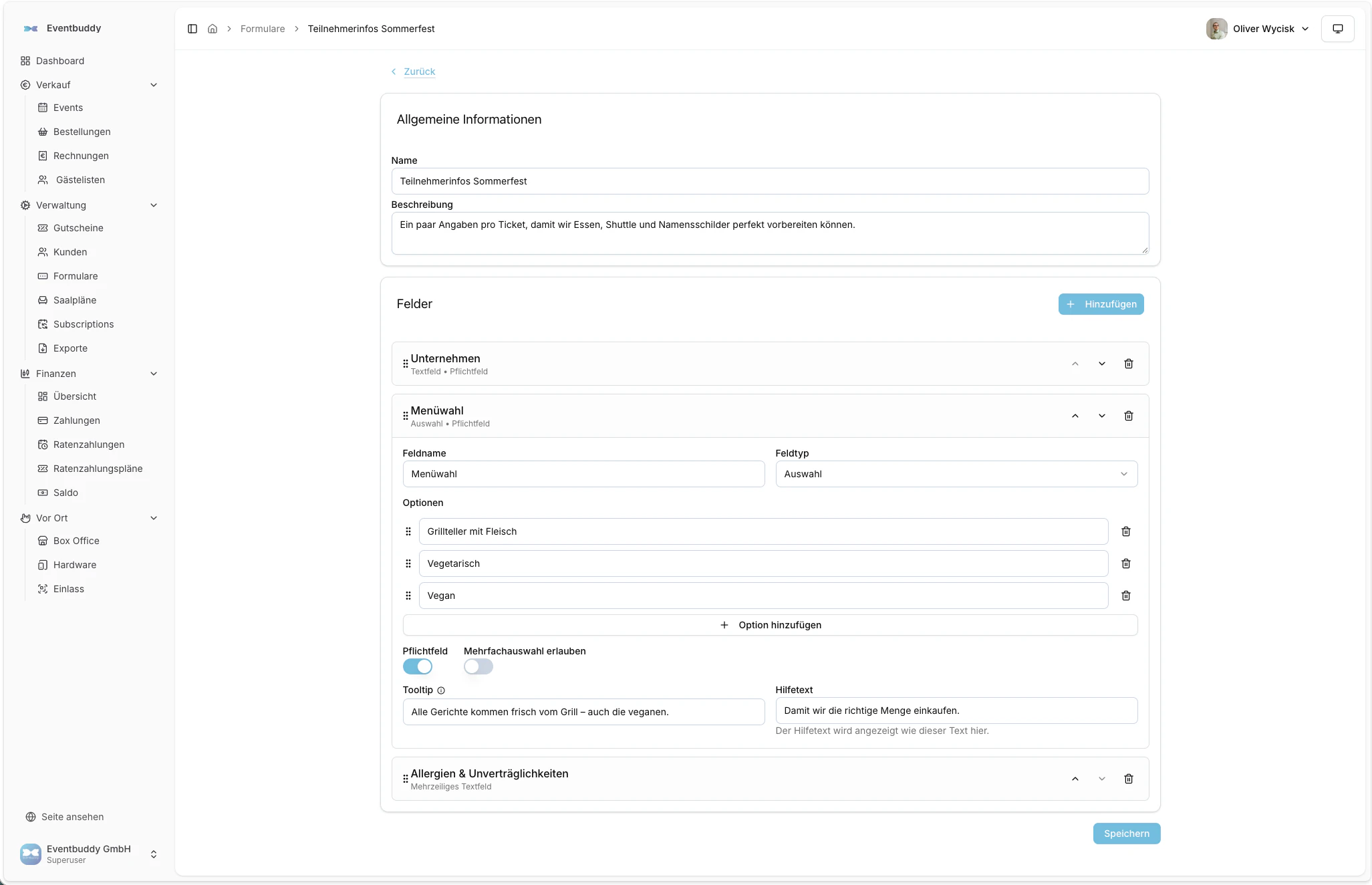
You build forms from text fields, email, phone, dropdown lists, checkboxes, toggles and file upload. Every field can be required and have a help text. You reuse a form for as many events as you like.
Per order or per person
Some questions you ask once per order, such as the company's billing address. Others per ticket, such as each guest's name and meal preference. That way, with a group of five, you know who eats vegetarian.
Upload proof right away
With file upload, guests upload a proof of enrollment, membership card or training certificate directly at registration. You set which file types are allowed and how large a file can be.
- Images, PDF, Word, Excel, CSV or text
- Size limit per file, 5 MB by default
- One or several files per field
Annual pass 2027
Sample family, card 2 of 4
What else is possible
Company details
Ask for organization, tax number, phone, address or date of birth per event.
Reason for declining
A form of its own for guests who decline.
Learn more: Reason for decliningAnswers in the export
In the exports for orders, tickets and declines.
Learn more: Answers in the exportChange the name, if allowed
For transferable tickets, the buyer can later rewrite them to another person.
Combine with approval
Review the answers first, then accept the request.
Legal texts at checkout
Terms and conditions, privacy policy and your own documents to confirm.
Learn more: Legal texts at checkout
Questions about registration forms
Yes. In Eventbuddy you build your own forms from text fields, dropdown lists, checkboxes, toggles and file upload. You attach them to an event for the whole order or to a ticket type for each person.
Eventbuddy offers text, multi-line text, email, phone, selection with one or several answers, checkbox, toggle and file upload. Every field can be required and have a help text.
Yes. With the file upload field, attendees upload images, PDF, Word, Excel, CSV or text files. You set the allowed file types and the maximum file size; the default is 5 MB.
In Eventbuddy the answers appear on every order and every ticket. You get them collected in the exports for orders, tickets and declines, as CSV or Excel.
Yes. You create a form once in Eventbuddy and connect it to as many events or ticket types as you like.
Send us your list of questions.
In the demo we show you what your questions look like at checkout and where you find the answers again.
No base fee · Personal support · A company from Germany