
Reporting & export
Your numbers at a glance, your data as a file
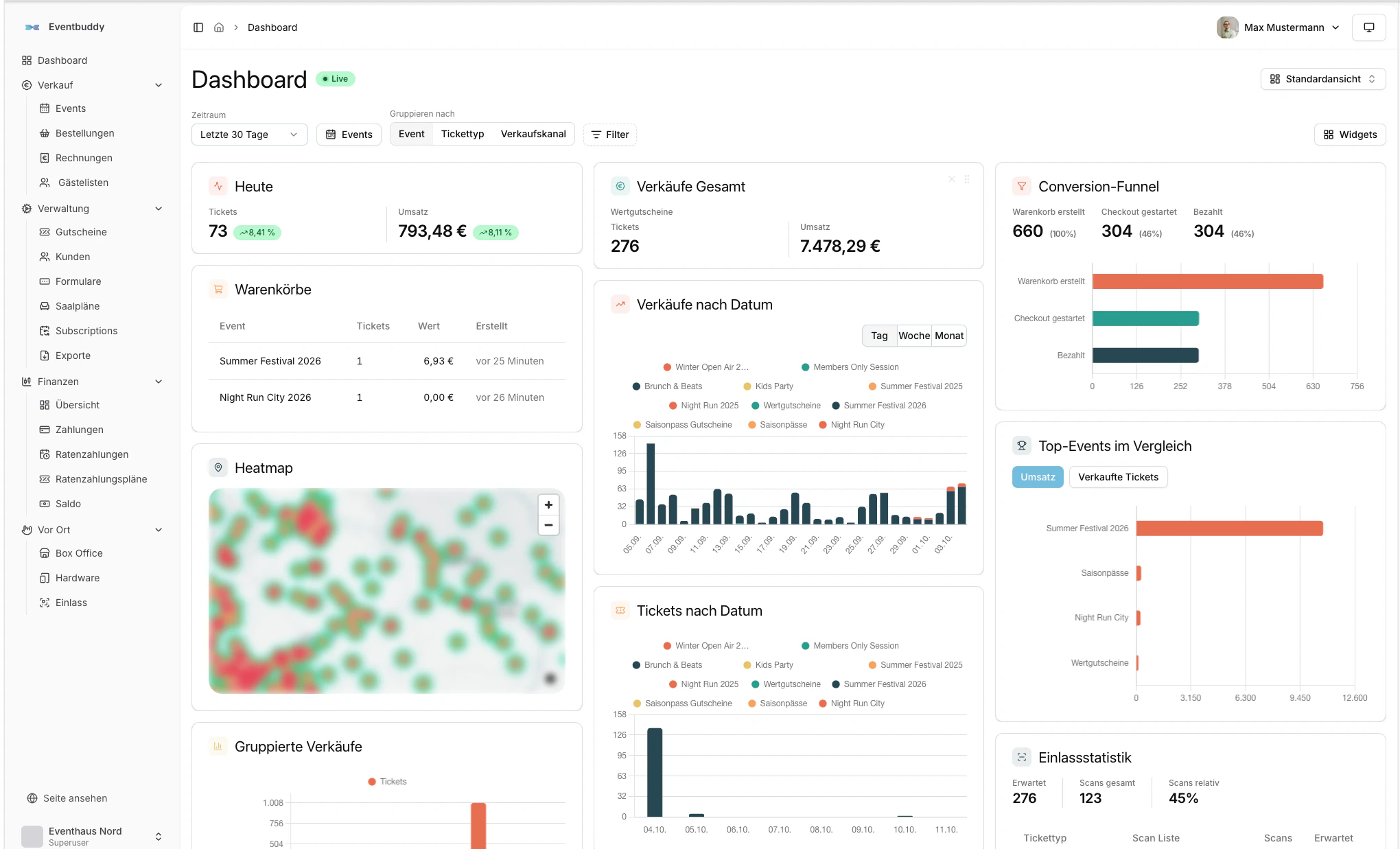
You want to know where you stand without opening Excel in the evening. In Eventbuddy's dashboard you see what's selling, where buyers drop off, what's still to come and who has already arrived. For your accounting and your other systems you export everything as a file, regularly and automatically if you like.
- No base fee
- Personal support
- A company from Germany
Sales funnel, last 7 days
- Cart412
- Checkout268
- Paid231
Live carts
7
in the shop right now
A dashboard you put together yourself
You see sales by day, week or month, the paths from cart to payment, a revenue forecast, top events and a sales map. Live carts show who is buying right now. You save your views for yourself or share them with the team.
- Conversion from cart through checkout to payment
- Revenue forecast and sales by period
- Sales map and heatmap of sales times
- Saved dashboards, private or shared
Who still owes you money
The finance overview shows what is open, received, in balance and paid out, across every payment method. Below it are the payments that need attention: overdue invoices and instalments at risk in the next 14 days, for example because a card is expiring.
- Open
- €3,480.00
- Due
- €1,140.00
- Received
- €12,615.00
- Overdue
- €360.00
Exports that arrive by themselves
You export orders, tickets, customers, guest lists, discount codes, scans, declines, invitation codes, payments and instalments as CSV or Excel. Large exports run in the background. With a schedule they arrive daily, weekly or monthly by email, FTP, SFTP or in an S3 bucket.
Exports
- TicketsExcel
- OrdersCSV
- PaymentsCSV
Everyone sees what they need.
You assign permissions per person, split finely into read, edit, scan and finances. The “Accounting” role sees all finances and can change nothing. Helpers at the door may only scan.
What else is included
Filters on every table
Filter orders, customers, guest lists, invoices and payments by anything.
Customer file
Every person and company with orders, invoices and notes.
Change history
Who changed what and when, and every step of a payment.
Webhooks
Your systems learn immediately about confirmed and paid orders.
Entry statistics
Scans by time and entrance in the dashboard.
Learn more: Entry statisticsStatement for every payout
With an invoice, also as XRechnung.
Learn more: Statement for every payout
Questions about reporting and export
From Eventbuddy you export orders, tickets, customers, guest lists, discount codes, scans, declines, invitation codes, payments and instalments, each as CSV or Excel. Answers from your own forms appear in the exports for orders, tickets and declines.
Yes. In Eventbuddy you set up export schedules, daily, weekly or monthly. The files go automatically by email, FTP, SFTP or into an S3 bucket.
No, Eventbuddy doesn't offer a DATEV export for organizers today. Your accounting gets the invoices as PDF, ZUGFeRD and XRechnung and can receive exports as CSV or Excel on a regular basis.
Through webhooks, Eventbuddy reports confirmed and paid orders to your systems immediately. On top of that come regular exports by SFTP, FTP, S3 or email. There are no ready-made integrations with CRM or newsletter tools.
Yes. Eventbuddy has an “Accounting” role with access to all finances and invoices, read-only. Editing and scanning are blocked for this role.
Eventbuddy's dashboard shows sales by period, the conversion from cart to payment, a revenue forecast, live carts, top events, a sales map and entry statistics. You put it together yourself and save your own views.
Goes well with
- Invoices & e-invoicingThe ticketing your accounting department likes.
- Pay by invoice & instalmentsCompanies pay by bank transfer, expensive tickets in instalments.
- Networks & associationsMember prices, guest lists and invoices to companies.
- Trade fairsDay tickets, trade visitor registration and entry with scan lists.
See your numbers before you start.
In the demo we show you the dashboard, the finance overview and an export the way your accounting would receive it. Afterwards you'll know which numbers you'll never gather by hand again.
No base fee · Personal support · A company from Germany