
Wristbands or digital tickets for your beer tent?
Mailing wristbands costs postage and time. A QR ticket in the guest's wallet saves both. When a wristband still pays off and how to combine the two.
For the reservation itself, a digital ticket is almost always the better choice. Wristbands have to be printed, sorted and shipped insured; a QR ticket in the guest's phone wallet arrives instantly. Wristbands still earn their place inside the tent: when guests step out and come back, or when servers need to see the area at a glance. Many tents combine the two: scan the QR code, hand out the wristband.
How wristbands work today
At Oktoberfest, the wristband is the seat reservation. An example from one Munich tent's 2026 terms (Rischart Oktoberfest 2026, German):
- Wristbands only ship after full payment, insured, by courier. No pickup.
- Guests pay 1.50 € per person plus shipping: 16.90 € for up to 1,000 € insured value within Germany, up to 47.90 € to Switzerland.
- The wristband color marks the reservation day. Guests must check the colors against the packing slip on arrival; later complaints are excluded.
- The tent does not hand out extra wristbands.
For the tent that means: order wristbands, sort them by area and session, pack, ship, answer complaints. Flat shipping fees have also become a legal risk in Germany. In 2026 the Regional Court Stuttgart banned a 12.00 € flat fee for a DHL shipment (Verbraucherzentrale, Weeber case, German, not yet final).
Wristband vs. QR ticket
| Wristband by mail | QR ticket in the wallet | |
|---|---|---|
| Reaches the guest | Days after payment | Right after payment |
| Cost per booking | Wristband, packaging, insured shipping | No shipping |
| Lost | Hard or impossible to replace | Resent from the email or by the tent |
| Resale | Changes hands unnoticed | Each code works once; a copy shows up at the scan |
| Cancellation | Wristband is already out | Ticket becomes invalid, in the wallet too |
| Leaving and coming back | Wristband stays on | Needs another scan |
| Seeing the area | At a glance from the color | Only on the phone |
When a wristband still pays off
- Lots of coming and going. Smokers, beer garden, rides: if guests step out often, a wristband beats any scan.
- Areas inside the tent. Servers recognize gallery, box or center aisle by color.
- Age checks. A separate wristband for under-18s helps at the bar.
For all of these, you only need the wristband inside the tent, not in the mail beforehand.
Combine both: scan, then hand out the wristband
Sell online
The guest books and pays online and gets one ticket with a QR code per person.
One entrance list per session
Each session gets its own scan list, so nobody gets in for the evening with a lunch ticket.
Scan and hand out the wristband
At the door your team scans the code and puts on the right-colored wristband. A note on the ticket type tells the team which color.
From then on, the wristband counts
Anyone leaving and coming back shows the wristband. The QR code has done its job.
You only buy wristbands for guests who actually show up, and you mail nothing.
How Eventbuddy handles it
Eventbuddy does not supply wristbands; you keep ordering them from your supplier. Eventbuddy takes care of the ticket and the scan.
- Tickets in the wallet. Every ticket can go into Apple or Google Wallet with no setup on your side. If the date changes, the pass updates (Tickets in Apple Wallet and Google Wallet).
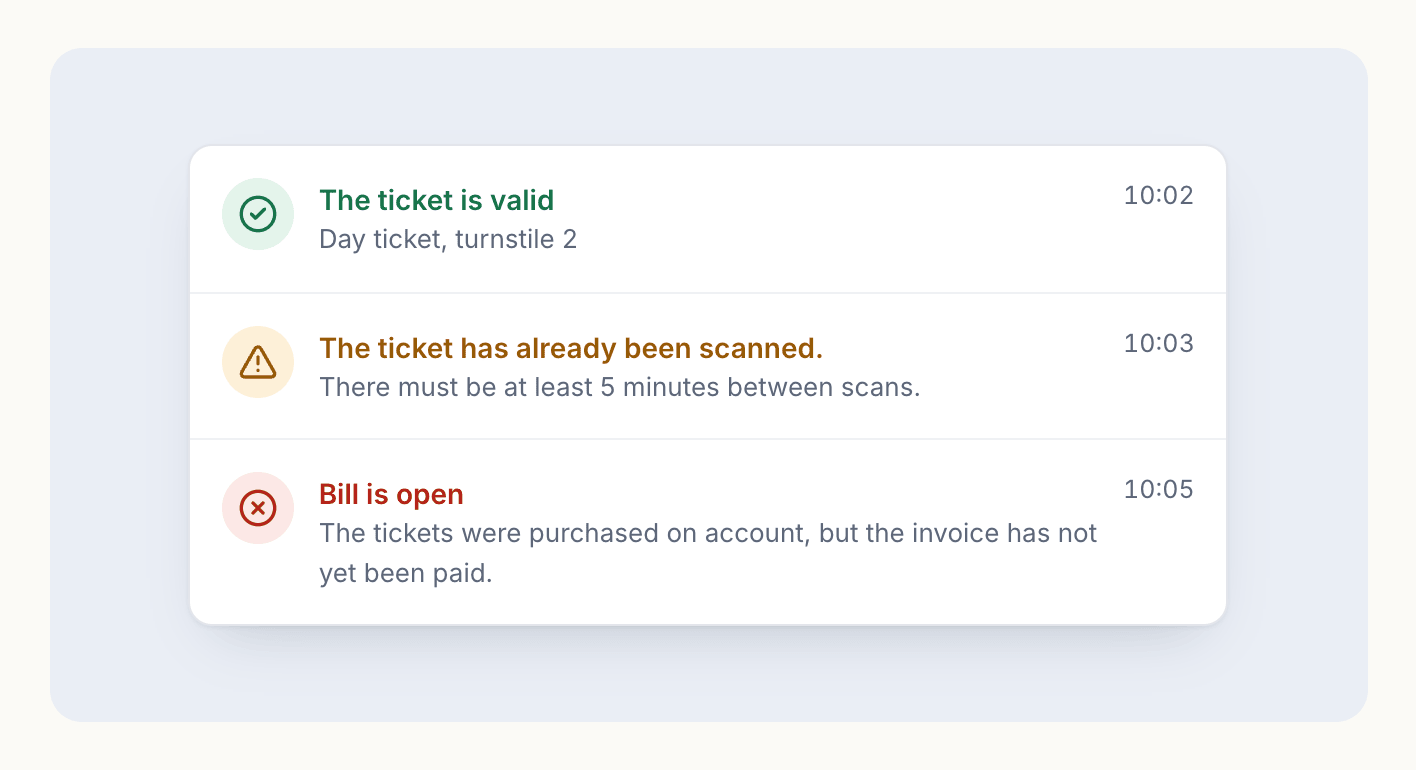
- Scan lists per session. You decide which tickets are valid at which entrance. A second scan of the same ticket shows "already scanned" with the time (Scan tickets).
- A note for your team. A scan note on the ticket type, such as "Gallery wristband, blue", shows up when scanning. Guests don't see it.
- Rental handheld scanners. For large tents you can rent handheld scanners from Eventbuddy (Entry).
- See who has arrived, live. The event cockpit counts valid scans per entrance and ticket type. It counts entries, not who is in the tent right now, since nobody scans on the way out.
More on reservations, tables and entry for tents is on the beer festivals page.
FAQ
Does every guest need a smartphone?
No. Every Eventbuddy ticket is also available as a PDF to print. The QR code on paper works at the entrance just like the one in the wallet.
What if someone forwards their ticket?
The first scan counts; every scan after that shows "already scanned" with the time and who scanned it. If each ticket should carry a name, turn on personalization on the ticket type.
Can guests leave and come back with the QR code?
A ticket is valid once per scan list. Your team can let a guest back in with "Check in anyway". With a lot of coming and going, a wristband after the first scan is simpler.
Does Eventbuddy supply wristbands?
No. Eventbuddy sells and checks the tickets and rents out handheld scanners. You buy wristbands from your supplier.
Ready by opening day
Done stuffing wristbands into envelopes? Our team sets up your tent with you, and together we fix a date before your reservations open by which everything is set up and tested. Get a test shop for your tent