
Annual pass in Apple Wallet and Google Wallet: a guide for leisure parks
Guests want their annual pass on their phone. What a wallet pass shows, why the photo stays at the gate, and how guests find the button.
Yes, an annual pass can live in Apple Wallet or Google Wallet, as long as your ticketing system issues wallet passes. After buying, the guest taps a button and the pass sits on their phone with its QR code. At the gate, they show their phone and your staff scan it like any other ticket. For annual passes this pays off in particular: the pass gets used often, and a pass on the phone gets forgotten less than a paper one.
Why guests look for it
Guests search for "add annual pass to wallet" because they need the pass on every visit. A card in a purse stays at home now and then, a PDF in an email has to be dug up first, and at a turnstile with poor reception the email won't load. A wallet pass is stored offline on the phone and is two swipes away.
For you, that means fewer guests searching at the gate and fewer requests like "I forgot my pass, can you look me up?"
What a wallet pass shows, and what it doesn't
| Content | On the pass? |
|---|---|
| QR code for entry | Yes |
| Park logo and cover image | Yes |
| Pass type, for example "Annual pass adult" | Yes |
| Guest name | Yes, if the pass carries a name |
| Guest photo | No, your staff see it on the scanner |
| Price and payment details | No |
The photo doesn't belong on the pass; it belongs on the scanner. The reason: whatever sits on the guest's phone, the guest can edit, and a screenshot is quickly altered. The photo on the scanner comes from your system. Your staff see the stored photo when they scan, no matter which phone the code is on. How that works is in the guide Annual pass with photo.
What to tell your guests
Most guests don't know there's a wallet button. Three places to mention it:
In the order confirmation
One sentence is enough: "Add your annual pass to Apple Wallet or Google Wallet now, and you'll have it with you on every visit."
On the annual pass page of your website
In the FAQ: "Can I put my annual pass on my phone?" With a short note on where the button is.
At the gate
A sign at the turnstile or ticket booth: "Annual pass on your phone? Just show the QR code."
For families, one more tip helps: if an order has several passes, all of them can go into the wallet at once. Each pass is still its own pass with its own code, and with photo passes each one belongs to a different face.
When something changes
One advantage over a PDF: a wallet pass can change after the fact. If you correct the name on a pass, the pass on the guest's phone updates. If you cancel a pass, it becomes invalid. A PDF stays as it is, and a canceled pass looks just like a valid one on paper. It's still caught at the gate, because the scanner checks the code.
How Eventbuddy handles it
With Eventbuddy, the wallet pass comes with every order. There's nothing to set up.
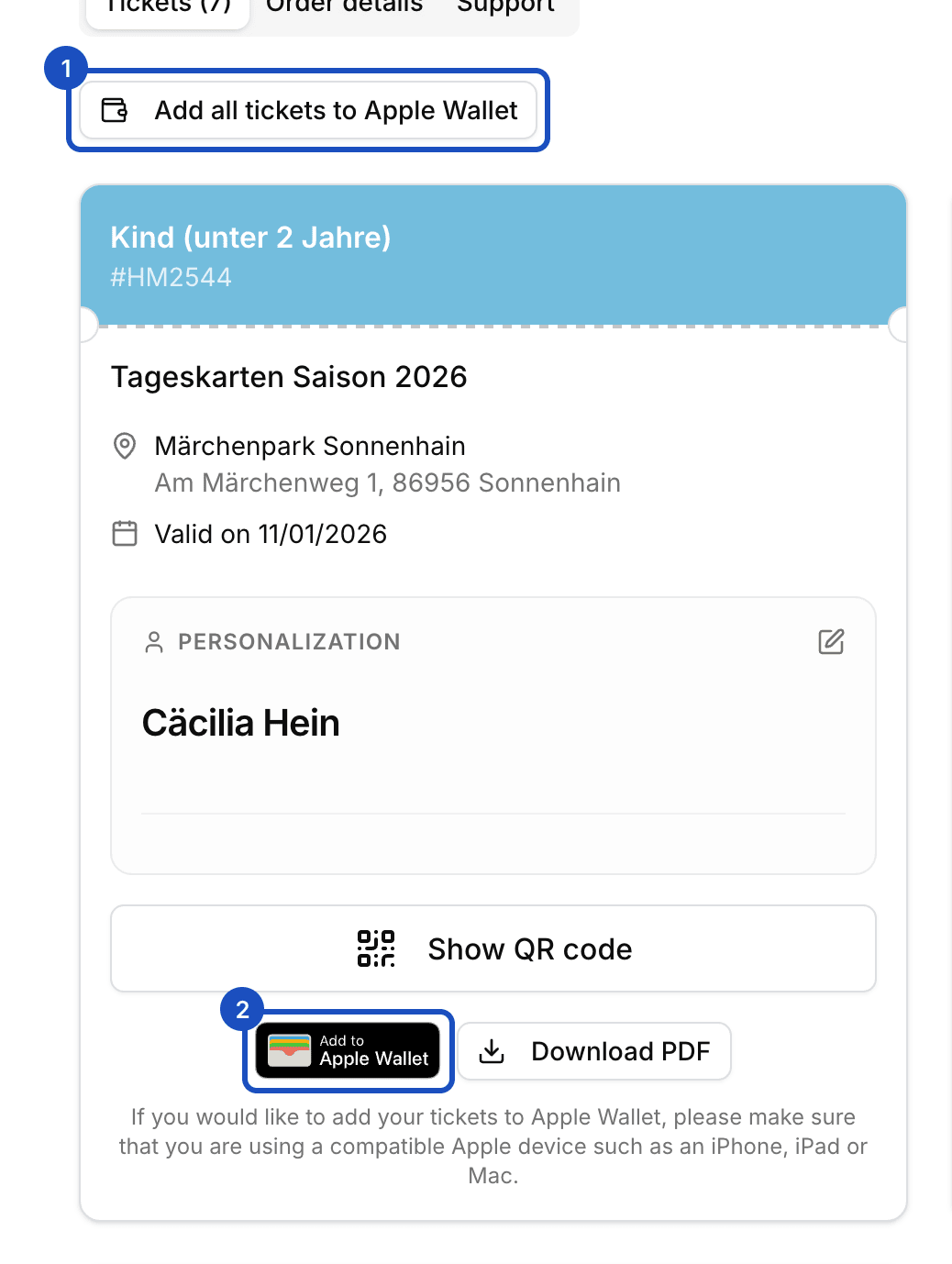
- The button: after buying, the guest opens their order from the confirmation email. Under each pass are the Apple Wallet and Google Wallet buttons. An iPhone only shows Apple Wallet, an Android phone only Google Wallet.
- All at once: if an order has several passes, the guest adds them all to the wallet with one button.
- Your branding: the pass carries your logo and the event's cover image, and its language follows the guest's language.
- Staying current: when you change the guest name on a pass or the venue, Eventbuddy updates the pass. Canceled or deactivated passes become invalid in the wallet.
- After the scan: after a valid scan, the pass shows the check-in time.
- The photo: it stays on the scanner. If it's missing, the scanner says "The photo is missing." and your staff take it on the spot (photo on the annual pass).
If a guest deleted the email, resend the order confirmation from the admin. You can also download the pass yourself and forward it (tickets in Apple Wallet and Google Wallet).
How long your annual passes are valid and how guests renew is in the guide How long is an annual pass valid?. The full setup for parks is on the page for leisure parks.
FAQ
Can you save an annual pass in Apple Wallet or Google Wallet?
If the park offers wallet passes, yes. With Eventbuddy, the button sits under every pass on the order page. The wallet pass carries the same QR code as the PDF.
Does the wallet pass show the photo on the annual pass?
No. Your staff see the photo on the scanner when they scan. It comes from your system, not from the guest's phone, so it can't be swapped.
Do guests need the wallet to get in?
No. The QR code on the PDF works the same way. The wallet is just more convenient, because the pass is on the phone without searching.
What happens to the pass when I cancel it?
With Eventbuddy, the pass becomes invalid in the wallet. At the gate the pass no longer works, whether the guest shows the wallet pass or the PDF.
Ready by opening day
Want to sell annual passes next season that your guests can keep on their phone? Our team sets up your park with you, and together we fix a date before your opening day by which everything is set up and tested. Get your switch plan