
Beer tent table reservations: from email and spreadsheets to online sales
How to move beer tent table reservations online, with a checklist template for sessions, table sizes, quotas and terms.
Yes, you can sell beer tent table reservations entirely online. Instead of a request form, a manual confirmation and waiting for a bank transfer, the guest picks a session and a table, pays right away and gets the tickets by email. The confirmation is the ticket. Tables you want to keep for walk-ins simply never go on sale.
How most tents handle reservations today
Most tents still run on request forms, email and spreadsheets. A typical Oktoberfest flow: the guest sends a request, the tent confirms in writing, then the guest has 14 days to pay by bank transfer. If the money doesn't arrive, the reservation lapses. Only then do the entry wristbands go out by mail (Rischart Oktoberfest 2026 terms, German).
That eats time in three places:
- Sorting requests. Who asked first, who is a regular, which table is still free?
- Matching payments. Transfers without a booking number, partial payments, reminders.
- Following up. Tables that free up after 14 days have to be given out again.
What changes when you go online
There are no more requests to work through. Guests see what is free and book it. Payment happens at checkout, so there is nothing to match. When a table is gone, it's gone. Tables freed by a cancellation go back on sale.
If you still want to check every booking yourself, you can: the guest books and pays, and you approve or decline. A declined guest gets their money back.
Template: what you need before you sell online
Plenty of people search for a spreadsheet template for table reservations. Before you set up any software, this list helps more. Fill it in once and your tent almost sets itself up.
| Item | What you decide | Example |
|---|---|---|
| Sessions | Which time slots you sell | Lunch 11 am to 4 pm, evening from 5 pm, weekends separate |
| Table sizes | How many people per table | Table for 10, box for 20 |
| Areas and prices | What a seat costs where | Center aisle, gallery, box |
| Food and drink | What the price includes | Table for 10 incl. 10 × 40.00 € food and drink |
| Quotas | How many tables per session go online | 60 of 80 tables, 20 kept for walk-ins |
| Sales start | Who can book from when | Regulars from March 1, everyone from March 20 |
| Companies | Whether companies can pay by invoice | Yes, with an invoice as PDF or XRechnung |
| Legal texts | Terms, cancellation, house rules | Reservation terms 2027, dated |
There are recent German court rulings on food vouchers and fees in tent terms. Have your terms reviewed before you set prices.
Template: reservation terms for your beer tent
Most guest questions come back to the same points: how long the table is held, when payment is due and what happens if someone can't come. Write the answers down once and attach them to every reservation. Copy the template and replace the values in square brackets with your own.
Reservation terms [tent name] [year]

1. Sessions
Lunch session: [11 am to 4 pm]. Evening session: [from 5 pm].
The reservation is valid for the booked session. At the end of
the session, the table is cleared for the next guests.

2. Table sizes
A table seats [10], a box seats [20].
Reservations are always for the whole table.

3. Late arrival
The table is held until [30 minutes] after the session starts.
After that, we may give it to other guests.

4. Payment
The reservation price is due [at booking / within 7 days of
booking]. If payment hasn't arrived by then, the reservation lapses.

5. Transfer instead of cancellation
Cancellation is [not possible]. The reservation can be transferred
to other people free of charge until [7 days before the date].
An email to the address below is enough.

6. Contact
[Organizer name, address, email, phone,
available Mon to Fri, 9 am to 5 pm]
In Eventbuddy you attach the finished terms to the checkout as a document of their own. The guest confirms them with a checkbox and gets them with the order confirmation.
Online in five steps
Map your tent
Draw a plan with tables, boxes and the gallery, or list the tables per area. Photos of last year's setup help.
Set sessions and prices
Each session gets its own quota. Saturday evening can sell out while Tuesday lunch still has room.
Invite regulars first
Before public sales open, send your regulars a code that lets them book early. It's fair, and it takes pressure off the first sales day.
Add your legal texts
Terms, cancellation rules and house rules belong in the checkout, not only on your website.
Test, then open
Book a table yourself, scan the ticket and cancel it again. Only then share the link.
Timeline
Many tents open reservations in March or April. At Oktoberfest 2026, one tent opened on April 1 (Rischart Oktoberfest 2026 terms, German). If your reservations open in March, your shop needs to be ready in February. That makes November through February your planning window.
How Eventbuddy handles it
- Seating plan with tables. You draw your tent in the browser with tables, categories and standing areas. Guests pick their seats in the shop. Eventbuddy turns on seating plans on request (Seating plan, Set up a seat map).
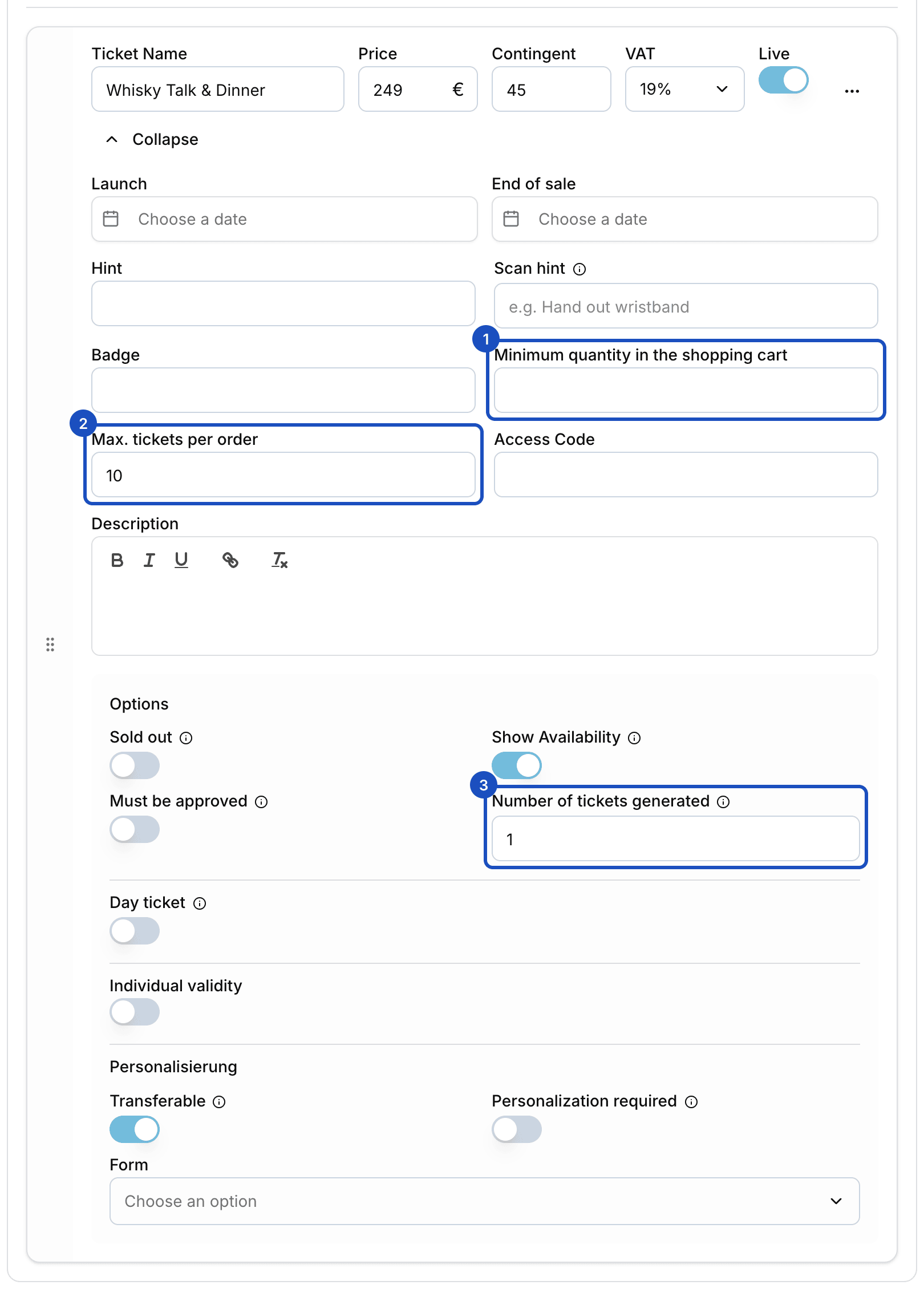
- A whole table as one ticket. Without a seating plan, a "Table for 10" ticket type creates ten tickets with their own QR codes for every booking (Set up ticket types).
- One session, one quota. Each session is its own event or its own ticket type with its own quantity and sales window.
- Regulars first. Invitation codes unlock hidden tables for regulars only, and you limit how often each code can be used (Member prices and access codes).
- Approve each booking if you want. With approval tickets you approve every order yourself or decline it with a reason (Tickets with approval).
- Companies pay by invoice. Eventbuddy writes the invoice as PDF, ZUGFeRD or XRechnung, and you see in the order whether it's paid. This is also turned on by Eventbuddy on request.
How this fits together for tent operators and clubs is on the beer festivals page.
FAQ
Do I need software, or is a spreadsheet template enough?
For a handful of tables, a spreadsheet works. Once you are matching payments, sending reminders and reassigning freed-up tables, a ticket shop saves the most time. You need the checklist above either way.
Can I sell a whole table as one booking?
Yes. A "Table for 10" ticket type in Eventbuddy creates ten tickets per booking, and the table counts as one against the quota. This works for ticket types without a seating plan. With a seating plan, guests pick the seats at a table one by one.
How do I keep tables free for walk-ins?
Just don't put them on sale online. The quota per session decides how many tables can be booked online.
Can regulars book before everyone else?
Yes. With invitation codes, only regulars see the tables you release for them. You set how often each code can be used.
Ready by opening day
Show us your tent before the requests start coming in. Our team sets up your tent with you, and together we fix a date before your reservations open by which everything is set up and tested. Get a test shop for your tent